MotionKit
MotionKit is a visual GSAP animation platform for WordPress that lets you create, preview, publish, and reuse animations…
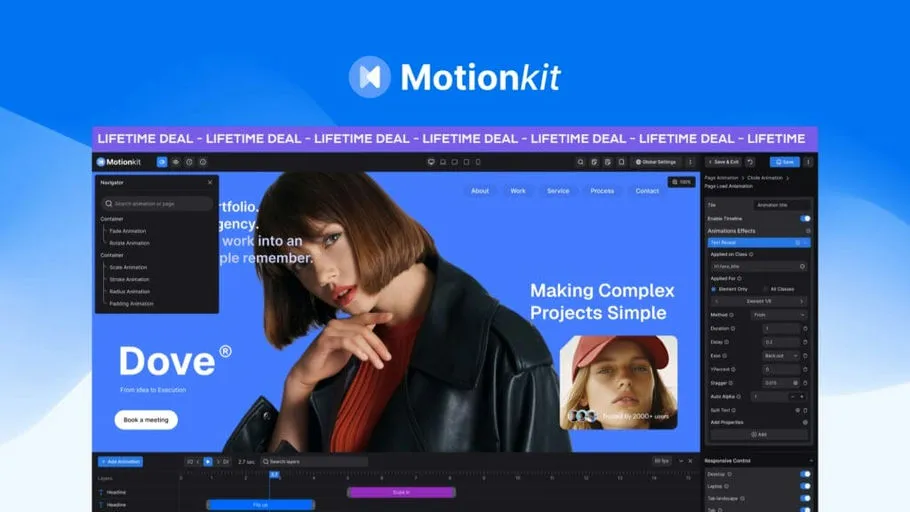
MotionKit — Visual GSAP Animation Tool for WordPress
TL;DR
MotionKit is a visual editor built around GSAP that brings professional, timeline-driven animations to WordPress without forcing you to write JavaScript. It works with virtually any page builder (Elementor, Divi, Gutenberg, Bricks, Oxygen, WPBakery, Avada, Breakdance, Beaver Builder, etc.) and exposes ScrollTrigger, timelines, and GSAP plugins through a visual interface. If you build client sites or premium templates and want consistent, reusable movement across projects, MotionKit streamlines the process.
What it does well
- Visual GSAP control: Instead of hand-coding timelines and selectors, you set duration, delay, easing, stagger, opacity, scale, rotation, and position through fields and live preview. This closely mirrors what GSAP provides but in a GUI.
- Visual timeline editor: Multiple elements are displayed as tracks so you can see and drag choreography the same way you would in video editing software. Sequencing becomes intuitive and faster than editing scattered numbers in code.
- ScrollTrigger made visual: Start/end markers, pinning, scrub vs play-once behavior, and scroll-back handling are adjustable while you view the markers on the real page. That removes a lot of guesswork and refresh cycles that typically accompany scroll-tied animations.
- Class-based targeting: MotionKit targets CSS classes rather than builder-generated IDs. This decision pays off when sections are rebuilt or repeated; animations remain bound to meaningful selectors and are portable between pages and projects.
- Responsive breakpoint control: You can customize or disable animations per device (desktop, laptop, tablet landscape, tablet, mobile). That helps avoid those awkward mobile behaviors that often ruin a carefully crafted desktop sequence.
- Preset library and plugin access: Over 100 presets for text and image reveals (typewriter, scramble, curtain, polygon reveals, 3D motion, etc.) accelerate common tasks. Core GSAP plugins—SplitText, DrawSVG, MotionPath—are exposed for advanced effects.
- Reusable animation library & JSON import/export: Save animations, export/import configurations, and reuse them across sites and clients. This supports a consistent design language across multiple properties.
- One-click publishing via connector: Open your live WordPress page inside MotionKit, build and preview animations, then publish back to that site using the connector plugin — a tight, practical workflow for production sites.
Key features (summary)
- Visual GSAP editor with full property control
- Visual timeline editor for sequencing
- ScrollTrigger visual controls (start/end/pin/scrub)
- Class-based element targeting
- 100+ presets for text and images
- SVG Draw and MotionPath support
- Text splitting animations and rich text effects
- Page transitions and horizontal scroll options
- Responsive breakpoint-specific settings
- Live preview on actual WordPress pages
- JSON import/export and reusable animation library
- Works with major WordPress page builders
- Multi-site/workspace support and team collaboration features for larger setups
Workflow (how you use it)
- Build your page with the page builder you already prefer.
- Install and activate MotionKit Connector on the WordPress site.
- Open the live page in MotionKit’s visual editor.
- Select elements by class, apply presets or build a custom animation.
- Use the timeline and ScrollTrigger controls to choreograph.
- Preview live, then publish to the connected site.
- Save animations to the reusable library for future reuse or export via JSON.
Pros
- Dramatically reduces time required to create complex GSAP animations.
- Makes choreographed sequences approachable for non-coders.
- Class-based targeting ensures animations survive content rebuilds and are portable.
- Responsive controls prevent mobile breakage and enable device-specific experiences.
- Presets plus full control give both speed and depth—good for beginners and pros.
- Export/import and a reusable library provide scalable workflows for agencies and teams.
- Live preview on the actual page avoids the typical iteration tension between editor and output.
Cons / Considerations
- Being a visual tool, extremely bespoke code-only tricks might still require manual GSAP work outside the editor.
- Since the product is early-stage, expect active development and possible growing pains as features mature.
- Reliance on a connector plugin introduces another component to maintain in client sites (though it’s necessary for the live-in-page workflow).
- Advanced performance considerations (script loading, cumulative layout shift, and animation impact on older devices) require attention during implementation—MotionKit gives control, but responsibility for optimization remains with the developer.
Who should consider MotionKit
- WordPress agencies and freelancers building premium, animated websites for clients.
- Web designers who want fine-grained choreography without becoming GSAP coders.
- Developers who want to speed up repeatable animation tasks and maintain a library of reusable effects.
- Template creators and teams delivering website kits with consistent motion language.
Final verdict
MotionKit fills a practical gap between hand-coding GSAP and using limited builder-specific animation panels. Its visual timeline, ScrollTrigger controls, class-based targeting, and reusable animation library make it a compelling tool for teams and individuals who need production-grade motion across multiple WordPress projects. For anyone delivering premium experiences where timing and sequence matter, MotionKit is worth evaluating—especially if you want to keep animation maintainable and portable across builders and client sites.