DigiParser
Parse invoices, POs, receipts, and more into structured data with AI—no templates required
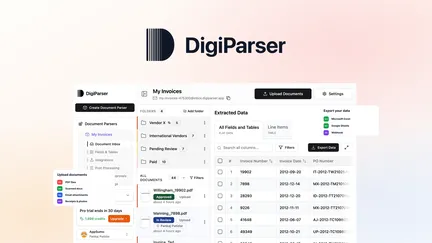
DigiParser — Independent Software Review
DigiParser is an AI-powered document parsing platform aimed at automating data extraction from invoices, receipts, purchase orders, bank statements, contracts, and many other recurring business documents. It focuses on bulk processing, flexible ingestion, and delivering structured outputs that integrate with downstream tools and workflows. Below I cover the core capabilities, onboarding, integrations, accuracy, security, strengths, limitations, and recommended user profiles.
First impressions and core value
DigiParser’s core promise is simple and compelling: eliminate manual copy-paste and rigid template-building by using AI to detect document schemas, split multi-document PDFs, classify pages, and extract fields and line items automatically. The strength is in handling large batches and mixed document types—drop a folder or forward an email and the system processes files in a queued pipeline, producing CSV/Excel/JSON outputs or sending results to external apps.
Key features
- Bulk processing: Upload up to 500 documents in a batch; files up to 300 MB each are supported. Background queuing and status visibility let you monitor processing across large batches.
- Auto-detection and custom parsers: AI can auto-detect schema/fields for common documents. You can also create custom parsers with point-and-click field definitions, table extraction, and line-item parsing.
- Split and classify: Multi-document PDFs are automatically split, and pages are classified so mixed batches can be routed to appropriate parsers without manual sorting.
- Routing and exports: Built-in routing rules allow documents to be classified and sent to different parsers; outputs can be pushed to Google Sheets, QuickBooks (and Xero), Zapier/Make/Pabbly, webhooks, or downloaded as CSV/Excel/JSON/XML.
- Ingestion methods: Files can be added via bulk upload, dedicated parser/folder email addresses, API, embeddable widget, Google Drive, Dropbox, or forwarded emails—flexible for both internal teams and client submissions.
- Post-processing and review: The interface supports reviewing and editing extracted values, refining field instructions, and reprocessing documents. Some tiers include per-field confidence scores and role-based access (useful for team workflows and QA).
- API & automation: REST API and webhook-based events enable tight automation and integrations; API access and advanced automation features are available on higher plan tiers.
- Supported formats: Wide format support—PDFs, images (PNG/JPG), DOCX, XLSX, PPTX, CSV, TXT, Markdown, HTML, JSON, XML.
Setup and onboarding
Onboarding is oriented toward practical use: start with a pre-built template for invoices or bank statements, or create a custom parser. The AI-assisted suggestions help refine parsers as new document variations arrive. The product includes help center docs and changelog resources. For teams, role-based access and review/approval flows are available, enabling controlled rollouts.
Accuracy and performance
The vendor reports high accuracy benchmarks (up to ~99.7% for clean digital documents). In practice, accuracy depends on document quality and layout variability. Clear, digital-origin PDFs and structured tables tend to yield excellent results; blurry scans and photographs will require more review and possibly corrective reprocessing. Per-field confidence scores (available on higher tiers) make it easier to triage which values need human verification.
Throughput is good for medium-sized teams: batch uploads, auto-queueing, and background processing let you scale without constant monitoring. Certain optional features (document classification, split-with-AI, confidence scores) may consume additional processing credits, which is worth planning for.
Integrations and workflow fit
Integration set is pragmatic: Google Sheets, QuickBooks/Xero, Zapier, Make, Pabbly Connect, and webhooks cover most common automation needs. The REST API supports deeper integrations for teams that want direct pipeline control. The ability to forward emails to a parser inbox and the embeddable widget are particularly helpful for client-facing intake flows.
Data protection and residency
DigiParser follows GDPR-aligned practices and positions itself as a data processor while customers remain controllers. Data is encrypted in transit and at rest; access uses secure signed URLs and tenant isolation. Default hosting is in the United States; EU data residency requires a separate enterprise arrangement. The platform states customer data is not used to train the AI models, which is important for privacy-conscious users.
Strengths
- Fast setup with AI-driven schema detection avoids long template-building cycles.
- Robust bulk processing and reliable queue/monitoring features.
- Flexible ingestion channels (email inbox, API, upload, cloud drives).
- Useful exports and standard integrations for accounting and automation workflows.
- Good support for custom fields and complex table/line-item extraction.
Limitations and considerations
- Document processing uses a credit model (one page = one credit) and some features consume extra credits; plan capacity and refill options should be understood to avoid interruptions.
- Advanced API access and some audit/insight features are limited to higher tiers.
- Default data storage in the U.S.; organizations requiring EU residency must negotiate enterprise arrangements.
- Accuracy can fall on low-quality scans and highly unstructured documents—expect some manual validation depending on source quality.
Ideal users
- Accountants, bookkeepers, and finance teams with steady volumes of invoices/receipts.
- Small to medium businesses needing to automate recurring document workflows.
- Freelancers and operations teams who want to replace manual data entry with structured outputs.
Final recommendation
DigiParser is a practical, feature-rich document parsing tool that bridges the gap between rigid template-based extractors and fully custom OCR pipelines. It shines for teams with predictable recurring documents and those that need integrations into accounting and automation stacks. Evaluate expected monthly page volumes and integration requirements during the trial phase, and test with representative samples (including lower-quality scans) to estimate real-world accuracy and credit usage. For organizations wanting fast time-to-value on document automation, DigiParser is a compelling option.
